
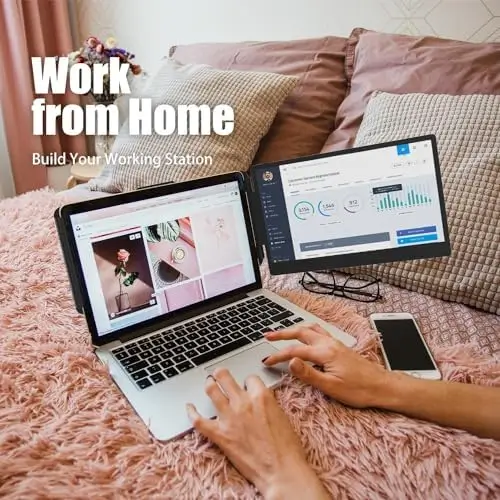
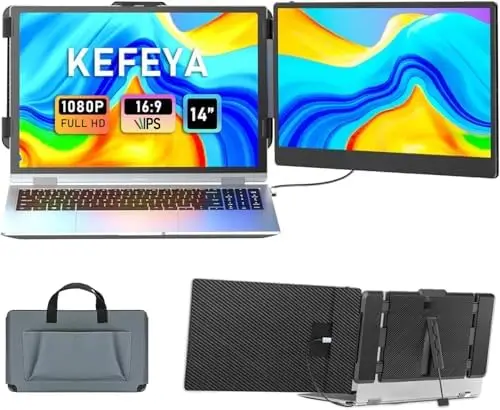
The KEFEYA 14-inch Laptop Screen Extender is designed for people who want to expand their laptop workspace without carrying a full-sized external monitor. With a Full HD 1080p IPS display, USB-C and HDMI connectivity, multiple viewing modes, 180-degree rotation, and broad device compatibility, this portable monitor extender offers a convenient way to add a second screen to a laptop setup.
For remote workers, students, programmers, stock traders, IT professionals, content consumers, and gamers, the advantage of having an additional display is straightforward: more information can remain visible at the same time. Instead of constantly switching between applications or browser tabs, users can distribute their workflow across two screens.
The KEFEYA extender focuses on making that experience portable and relatively simple to set up, making it particularly attractive for users who work away from a permanent desk.
14-Inch Full HD IPS Display
The KEFEYA screen extender features a 14-inch IPS panel with a 1920 x 1080 Full HD resolution.
This provides a useful balance between screen size, clarity, and portability.
The 16:9 aspect ratio is familiar for laptops, videos, games, presentations, and general desktop applications, while the 60Hz refresh rate makes the display suitable for everyday productivity and entertainment.
The monitor offers 300 nits of brightness and a 72% NTSC color gamut, providing a vibrant visual experience for common work and multimedia tasks.
The IPS technology also makes the display suitable for collaborative situations because it provides a broad viewing perspective.
Whether the second screen is positioned beside a laptop for productivity or rotated for a particular presentation, users can maintain a clear view of the content.
A More Efficient Dual-Screen Workspace
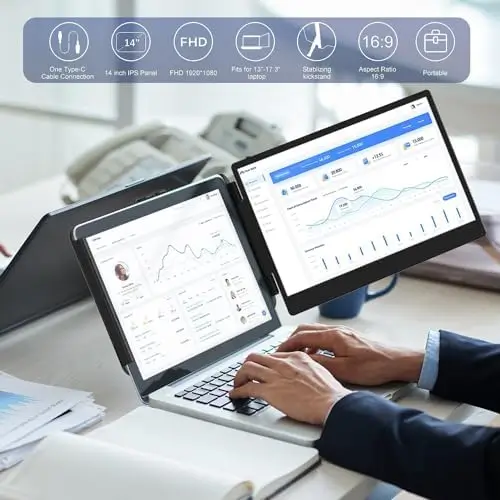
The primary reason to choose a laptop screen extender is to gain additional workspace.
A single laptop display can become restrictive when several applications need to remain visible.
With the KEFEYA extender, users can keep two sets of information open simultaneously.
For example, a remote worker can place a video conference on one screen while keeping documents or project software visible on the other.
A programmer can display code on one screen and documentation, a browser, or a terminal on the second.
View on Amazon
Students can keep research material on the additional display while writing an assignment on the laptop.
Traders can use one screen for charts and another for supporting information.
The key benefit is reduced reliance on constantly switching between windows.
This can make multitasking more convenient and create a more organized workflow.
Full HD Image Quality
The 1920 x 1080 resolution provides enough detail for a broad range of applications.
Text, spreadsheets, browser windows, presentations, and documents can be displayed clearly, while video content can take advantage of the monitor’s native Full HD resolution.
The display also allows users to independently adjust settings such as brightness, contrast, and backlight.
This gives users greater control over the appearance of the second screen and allows them to adapt it to different environments.
For example, a brighter setting may be useful in a well-lit workspace, while a lower brightness level can be more comfortable in a darker room.
Eye-Friendly Design
Long working sessions can place significant demands on the eyes, especially when using multiple displays.
The KEFEYA monitor is designed with eye-friendly features intended to make extended viewing more comfortable.
The ability to independently adjust brightness and other display parameters also gives users additional control over their viewing environment.
For people who spend long periods working with documents, coding, researching, or attending online meetings, this flexibility can be particularly useful.
Good lighting and sensible screen positioning remain important, but a display with adjustable visual settings can help users create a more comfortable workstation.
Plug-and-Play Setup
Another major advantage of the KEFEYA extender is its straightforward connection process.
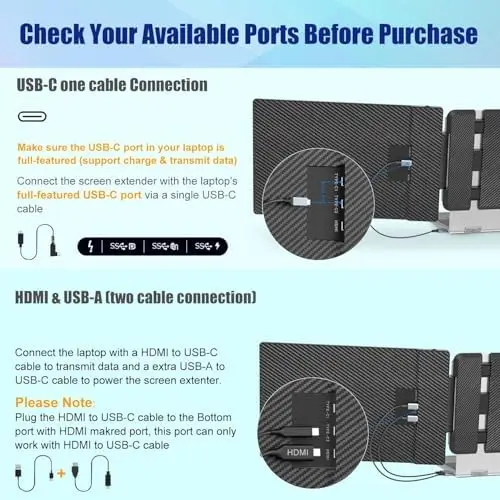
The package includes a Type-C cable, a USB-C to USB-A cable, and an HDMI cable.
This gives users several ways to connect the monitor depending on the capabilities of their laptop or other device.
For compatible USB-C systems, the setup can be particularly convenient.
The display is designed to operate without requiring additional driver downloads, reducing the complexity normally associated with adding another monitor.
This makes the extender appealing to users who want to expand their workspace quickly rather than spending significant time configuring additional software.
HDMI Connectivity
The HDMI connection provides another useful option for devices that do not support video output through USB-C.
When using HDMI, the monitor requires an additional USB-A to USB-C connection for power.
This is an important setup consideration, but it also means the extender can work with a broader selection of hardware.
The inclusion of multiple cables in the package makes the product more convenient for users who may switch between different devices.
Multiple Display Modes
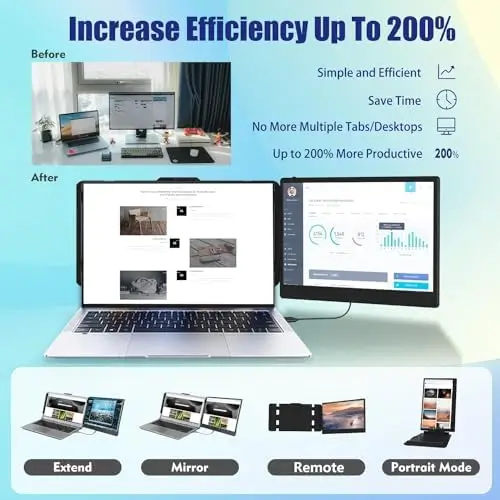
The KEFEYA extender supports multiple display configurations, including mirror mode and extension mode.
Extension mode is particularly useful for productivity because it allows the second monitor to function as additional desktop space.
Instead of displaying exactly the same content as the laptop, the second screen can show different applications.
Mirror mode is useful in situations where users want the same content visible on both displays.
For example, this can be helpful during presentations or when showing a laptop screen to another person.
Having both options means the monitor can adapt to different scenarios rather than being limited to a single configuration.
Landscape and Portrait Orientation
The extender also supports both landscape and portrait modes.
Landscape orientation is the natural choice for most desktop applications, video content, spreadsheets, and general multitasking.
Portrait mode can be particularly useful for reading long documents, viewing websites, working with code, displaying chat applications, or handling vertically oriented content.
This flexibility makes the additional screen more useful for different professional workflows.
A programmer may prefer portrait orientation for long code files, while a content creator may use it for vertically formatted material.
180-Degree Rotation
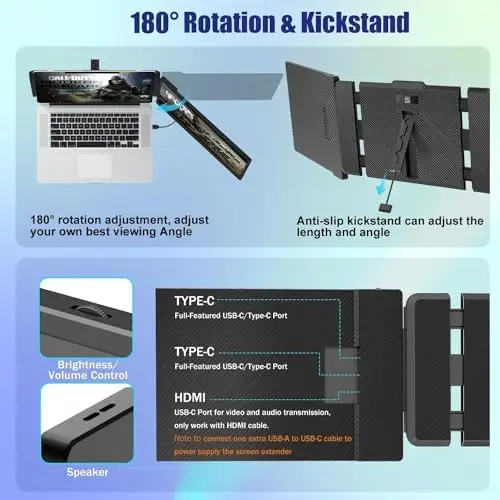
The KEFEYA monitor supports up to 180 degrees of rotation.
This allows users to adjust the position of the second screen according to their workspace and collaboration needs.
The ability to rotate the display can be useful when showing information to a colleague or client.
Instead of physically moving the entire laptop setup, users can adjust the screen’s orientation to make content easier for another person to see.
This is particularly valuable for mobile professionals who frequently collaborate in different environments.
Designed for Remote Workers
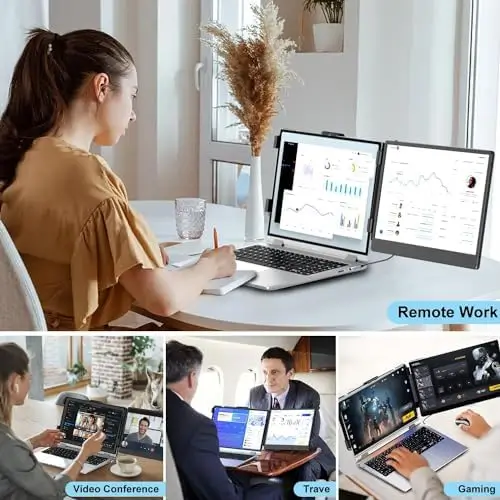
Remote workers are one of the clearest target audiences for the KEFEYA screen extender.
A laptop alone may be sufficient for basic tasks, but many professional workflows become easier when two screens are available.
With a second display, communication tools can remain open without taking valuable space away from the main application.
A worker might keep Microsoft Teams or another communication platform on the extender while using the laptop’s primary display for documents, spreadsheets, or project management tools.
This setup can reduce window switching and help maintain focus.
Useful for Programmers and IT Professionals
Programming and technical work can benefit significantly from additional screen space.
Developers often need to work with multiple windows at once, such as an integrated development environment, browser, documentation, terminal, testing tools, and communication applications.
The KEFEYA extender provides another display for this information.
For example, code can remain visible on the main laptop screen while documentation or a browser occupies the secondary display.
This can make referencing information more convenient and reduce repetitive window switching.
Suitable for Students
Students can also benefit from the portable dual-screen design.
Research and writing frequently require users to move between multiple sources of information.
With the KEFEYA extender, a student can keep an online lecture, research paper, browser, or reference document visible while using the primary laptop screen for note-taking or writing.
Because the monitor is portable, it can also be moved between a dorm, classroom, library, or home workspace.
This makes it a useful alternative to a permanent desktop monitor for students who frequently change locations.
Entertainment and Gaming
The KEFEYA extender can also be used for entertainment.
Its Full HD IPS display is suitable for watching videos, browsing, and other multimedia activities.
The monitor is also compatible with various gaming platforms according to the provided specifications, including PS4, Xbox, and Nintendo Switch.
This makes it more versatile than a monitor designed exclusively for laptop productivity.
Users can take the display with them and use it for entertainment when away from their main setup.
Broad Compatibility
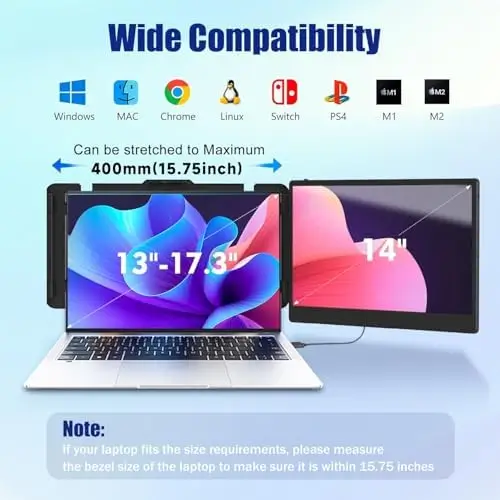
The extender is designed to work with a wide range of systems and processors.
Compatibility includes Windows, macOS, Chrome, Linux, Android, and various Intel, AMD, and ARM-based systems.
The specifications also mention compatibility with Mac devices using M1, M2, and M3 chips, as well as M1 Pro/Max and M2 Pro/Max configurations.
USB-C phones and gaming platforms such as PS4, Xbox, and Switch are also listed among supported devices.
This broad compatibility makes the KEFEYA monitor a flexible accessory for users who work with several types of hardware.
As always, users should verify that their particular device supports the necessary video output functionality before connecting the display.
Great for Working on the Go
Portability is one of the most important reasons to choose a screen extender rather than a traditional monitor.
A permanent desktop monitor is excellent for a home office, but it is not practical to carry between locations.
A portable laptop extender solves that problem by allowing users to take additional screen space wherever their laptop goes.
For business travelers, remote employees, students, freelancers, and digital professionals, this can be particularly useful.
A laptop that normally functions as a single-screen workstation can become a more capable dual-display setup when needed.
Final Verdict
The KEFEYA 14-inch Laptop Screen Extender is a practical and flexible solution for anyone who wants to expand a laptop’s display area without sacrificing mobility.
Its 14-inch Full HD IPS screen offers a useful combination of size and portability, while the 1920 x 1080 resolution provides clear and detailed visuals for productivity, entertainment, and compatible gaming.
The 300-nit brightness and 72% NTSC color gamut further support a vibrant viewing experience, while adjustable brightness, contrast, and backlight settings allow users to personalize the display.
Connectivity is another strong point.
With USB-C and HDMI options and the necessary cables included, the monitor can accommodate different laptop configurations and compatible external devices.
The plug-and-play design helps simplify installation, while the ability to use extension or mirror modes makes the monitor suitable for both productivity and presentation scenarios.
The support for landscape and portrait orientations adds another layer of flexibility, and 180-degree rotation makes screen sharing and collaboration more convenient.
For remote workers, the extender can provide a valuable second workspace for communication tools and productivity applications.
For programmers and IT professionals, it can keep documentation and supporting applications visible while the main screen remains focused on coding.
Students can use it for research and writing, while travelers can carry it as a lightweight addition to their mobile workstation.
Its broad compatibility with Windows, macOS, Chrome, Linux, Android, and various processors and devices further increases its versatility.
Overall, the KEFEYA 14-inch Laptop Screen Extender is an excellent choice for users who want more screen space without committing to a stationary monitor. Its Full HD IPS display, flexible connectivity, multiple viewing modes, 180-degree rotation, and broad compatibility make it a useful companion for work, study, entertainment, and gaming.
For anyone who regularly finds themselves switching between windows on a single laptop screen, adding a portable second display can be a meaningful productivity upgrade—and the KEFEYA extender provides a convenient way to bring that expanded workspace wherever you go.