
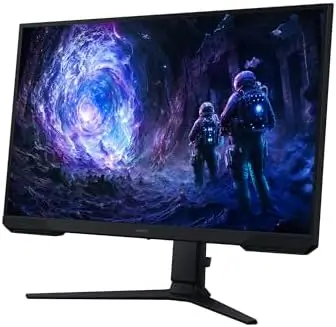
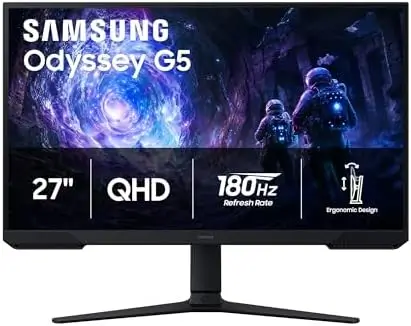
The Samsung 27-inch Odyssey G5 G51F is a gaming monitor designed to deliver a strong combination of sharp image quality, fast performance, adaptive synchronization, and ergonomic flexibility. With a QHD 2560 x 1440 resolution, 180Hz refresh rate, 1ms response time, AMD FreeSync, HDR10, and a height-adjustable stand, this monitor is built to give gamers a more immersive and responsive experience without overlooking everyday usability.
Samsung has equipped the Odyssey G5 with several features aimed specifically at competitive and fast-paced gaming. At the same time, its high-resolution panel and adjustable stand make it suitable for productivity, content consumption, and general desktop use.
For gamers looking to upgrade from a standard Full HD display, the combination of QHD resolution and a high refresh rate is one of the monitor’s biggest attractions.
QHD Resolution for Sharper Gaming
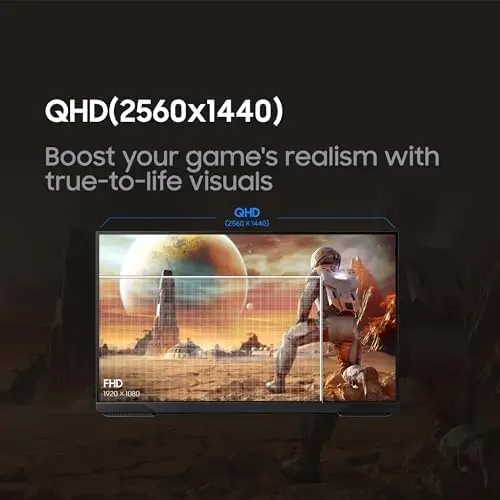
The Odyssey G5 G51F features a QHD resolution of 2560 x 1440.
This provides considerably more detail than a traditional Full HD 1920 x 1080 display. Samsung states that QHD offers approximately 1.7 times the pixel density of Full HD, allowing images to appear sharper and more detailed.
For gaming, this additional resolution can make environments, textures, characters, and smaller visual elements look more refined.
The higher pixel count can also be useful outside gaming.
A QHD monitor provides additional desktop space for applications, documents, browser windows, and creative tools. Users can fit more information onto the screen while maintaining a detailed image.
This makes the Odyssey G5 a versatile option for someone who wants one monitor for both gaming and everyday computer work.
180Hz Refresh Rate
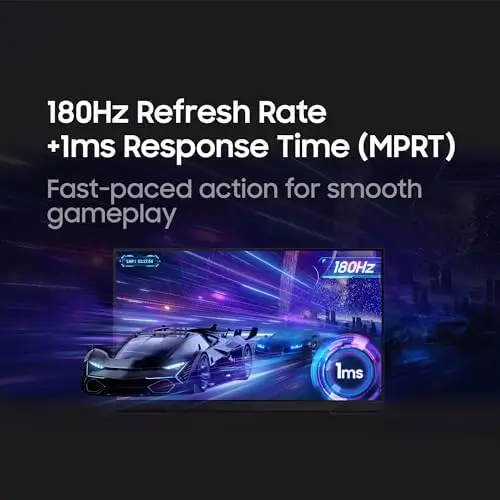
One of the monitor’s most important gaming features is its 180Hz refresh rate.
A higher refresh rate allows the display to update the image more frequently, producing smoother motion during fast-paced gameplay.
This is particularly useful in competitive games where quick movement and rapid camera changes are common.
Compared with conventional 60Hz displays, 180Hz can make motion feel significantly more fluid and responsive when the computer is capable of producing the necessary frame rates.
View on Amazon
Fast refresh rates can also make everyday interactions feel smoother, including scrolling through websites, moving windows, and navigating the operating system.
For gaming enthusiasts, however, the biggest benefit is the smoother presentation of fast on-screen action.
1ms Response Time
The Odyssey G5 also offers a 1ms response time specification.
Fast response time is important for gaming because it helps the monitor respond quickly to changes in the displayed image.
When combined with a high refresh rate, a fast response time can contribute to a more responsive visual experience.
This is particularly valuable in fast competitive games where players need to track moving targets and react quickly.
The combination of 180Hz and 1ms makes the monitor well suited to gamers who prioritize responsiveness and smooth motion.
AMD FreeSync Technology
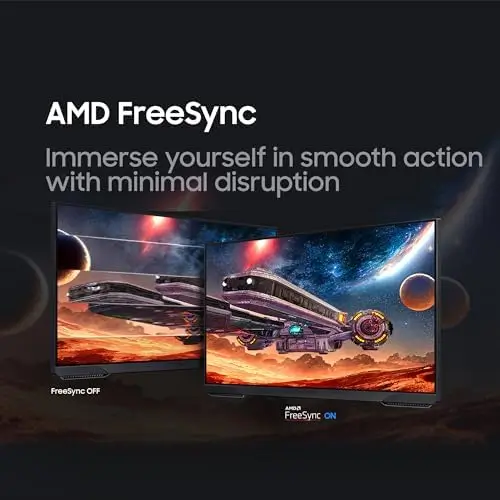
The monitor supports AMD FreeSync, an adaptive synchronization technology designed to reduce visual issues such as screen tearing and stuttering.
Screen tearing can occur when the monitor’s refresh cycle and the graphics card’s frame output are not synchronized.
FreeSync helps coordinate these elements to create a smoother gaming experience.
This can be particularly useful when frame rates fluctuate during demanding scenes.
Rather than experiencing obvious interruptions in motion, compatible systems can provide a more stable presentation.
For gamers using compatible AMD graphics hardware, FreeSync is an especially useful feature, although the overall experience depends on the GPU, game, settings, and supported refresh-rate range.
HDR10 for More Vivid Images
The Odyssey G5 includes HDR10 support.
High Dynamic Range is designed to improve the range between brighter highlights and darker areas of an image.
HDR10 can provide brighter highlights and more nuanced shadows, adding depth to supported games, movies, and other content.
When HDR content is properly supported, scenes can appear more dynamic, with greater differentiation between bright and dark elements.
This can contribute to a more immersive experience in games with detailed environments and cinematic lighting.
HDR support can also make the monitor more enjoyable for entertainment, giving compatible video content an additional layer of visual depth.
Actual HDR performance will naturally depend on the content, settings, and the capabilities of the display itself.
Black Equalizer for Dark Game Scenes
One particularly useful gaming feature is Samsung’s Black Equalizer.
Dark areas can create problems in competitive games because enemies or important objects may become difficult to see in shadows.
Black Equalizer allows users to adjust the visibility of dark areas.
By tuning the shadow levels, gamers can make details in darker portions of the screen easier to identify.
This can be particularly helpful in games featuring dark maps, nighttime environments, underground areas, or rooms with limited lighting.
Instead of simply increasing overall brightness, the Black Equalizer feature is designed specifically to improve visibility in darker areas.
This gives players greater control over how shadow detail appears during gameplay.
Virtual Aim Point
The monitor also includes Virtual Aim Point, a feature designed with gaming in mind.
An on-screen aiming point can be useful in certain game genres, especially first-person shooters.
Instead of relying entirely on an in-game crosshair, users can utilize the monitor’s built-in aiming feature.
This provides another customization option for gamers who want additional control over their aiming experience.
The feature complements the monitor’s broader focus on competitive gaming performance and responsiveness.
Auto Source Switch+
Another convenient feature is Auto Source Switch+.
A monitor connected to multiple devices can sometimes require manual input switching.
Auto Source Switch+ is designed to make source management more convenient by detecting an active source and switching accordingly.
This can be useful for users who connect multiple systems to the monitor, such as a gaming PC and another compatible device.
For a desk setup that combines gaming and general computing, automatic source management can make switching between devices simpler.
Ergonomic Adjustable Stand
Gaming performance is only part of a good monitor design.
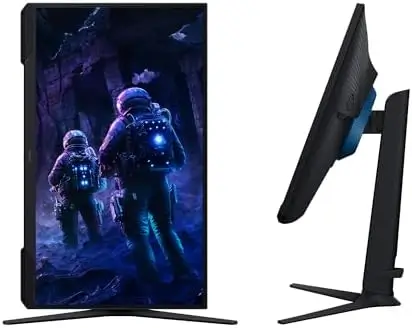
The Odyssey G5 includes an ergonomic stand that supports tilt, pivot, and height adjustments.
These adjustments allow users to position the screen according to their preferred seating position and desk configuration.
Height adjustment is particularly useful because users have different desk heights and seating arrangements.
Being able to raise or lower the display can help position the screen at a more comfortable viewing height.
Tilt adjustment allows the viewing angle to be customized, while pivot functionality provides additional flexibility for users who occasionally want to change the monitor’s orientation.
This makes the Odyssey G5 more adaptable than a display with a fixed stand.
Comfortable for Extended Sessions
Gaming sessions can last for hours, which makes ergonomic positioning especially important.
The adjustable stand allows users to fine-tune the monitor’s position instead of being forced to work around a fixed screen height.
A comfortable viewing angle can make a significant difference during extended gaming, studying, office work, or entertainment sessions.
The ability to customize the monitor’s height also makes it easier to create a balanced setup when using the Odyssey G5 alongside another display.
Ideal for PC Gaming
The combination of QHD resolution, 180Hz refresh rate, 1ms response time, and AMD FreeSync makes the Odyssey G5 particularly well suited to PC gaming.
The QHD resolution provides detailed visuals, while the high refresh rate emphasizes smooth movement.
The fast response time complements that refresh rate by supporting quick visual transitions.
FreeSync adds adaptive synchronization to help minimize tearing and stuttering.
Together, these technologies create a monitor designed around both image quality and responsiveness.
This combination can be especially attractive to gamers who play fast-paced competitive titles but also want the sharper visuals offered by QHD resolution.
Great for General Productivity
Although the Odyssey G5 is clearly designed as a gaming monitor, its QHD resolution and 27-inch size also make it useful for productivity.
The higher resolution gives users more workspace for documents, browser windows, spreadsheets, communication applications, and creative software.
A 27-inch QHD display can provide a useful balance between screen size and pixel density.
For students, professionals, and home users, the monitor can therefore serve as an everyday display rather than being limited to gaming.
The ergonomic stand further improves its suitability for long work sessions.
Entertainment and Media
The combination of QHD resolution and HDR10 also makes the Odyssey G5 suitable for entertainment.
Movies, streaming content, and other compatible HDR media can benefit from the display’s ability to present more nuanced highlights and shadows.
The 27-inch screen provides a comfortable viewing size for desk-based entertainment.
For users who alternate between gaming, streaming, browsing, and work, the monitor offers enough versatility to function as a central desktop display.
Final Verdict
The Samsung 27-inch Odyssey G5 G51F is a well-rounded gaming monitor that combines high-resolution visuals with fast gaming performance and useful ergonomic features.
Its QHD 2560 x 1440 resolution is a major advantage for gamers who want sharper and more detailed images than Full HD can provide. The increased pixel density makes game environments look more refined while also giving users additional desktop space for productivity.
The 180Hz refresh rate is another major highlight. It is designed to provide exceptionally smooth motion during fast-paced gaming, while the 1ms response time complements the high refresh rate with quick image response.
AMD FreeSync further improves the gaming experience by helping reduce screen tearing, stuttering, and lag when used with compatible hardware.
HDR10 adds another dimension to visual quality by supporting brighter highlights and more detailed shadows in compatible content.
Samsung’s gaming-specific features make the monitor even more appealing. Black Equalizer gives users greater control over dark areas, helping reveal details hidden in shadows, while Virtual Aim Point provides an additional aiming option for supported gaming scenarios.
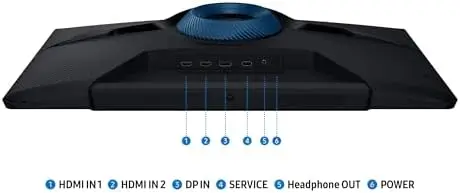
Auto Source Switch+ adds convenience for users connecting multiple devices, reducing the need to manually change inputs in certain situations.
The ergonomic stand is another strong point. With tilt, pivot, and height adjustment, users can position the display according to their preferred posture and desk configuration.
Overall, the Samsung Odyssey G5 G51F is a strong choice for gamers who want a balance of sharp QHD visuals, high-refresh-rate performance, responsive gameplay, and practical everyday features. With its 27-inch display, 180Hz refresh rate, 1ms response time, AMD FreeSync, HDR10, gaming-focused image controls, and adjustable stand, it offers a compelling setup for gaming, entertainment, and productivity in one display.