
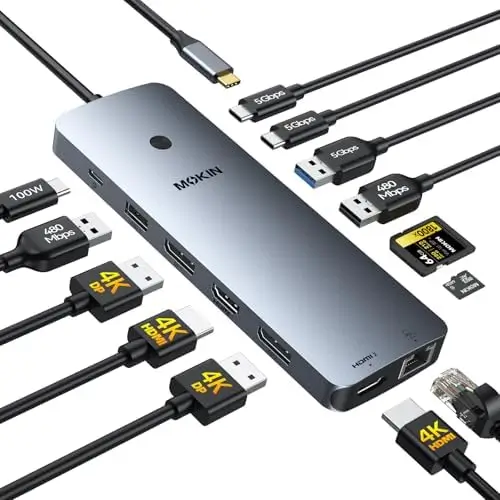
The MOKiN 14-in-1 Laptop Docking Station is designed to transform a compatible laptop into a complete desktop workstation by bringing multiple displays, high-speed USB connectivity, wired networking, memory card readers, and USB-C Power Delivery together in one convenient hub. With two HDMI ports, two DisplayPort outputs, multiple USB ports, SD and microSD card slots, Gigabit Ethernet, and up to 100W USB-C PD input, this docking station provides an impressive range of connectivity for professionals, creators, students, and home-office users.
For anyone working primarily from a laptop, the number of ports available on the computer can quickly become a limitation. Modern thin laptops often prioritize portability over extensive connectivity. A docking station solves that problem by allowing a single compatible USB-C connection to expand into a much larger desktop setup.
The MOKiN 14-in-1 model takes that concept further by emphasizing multi-monitor support and a broad selection of ports.
A Complete 14-in-1 Connectivity Solution
The biggest advantage of this MOKiN docking station is the sheer variety of connections it provides.
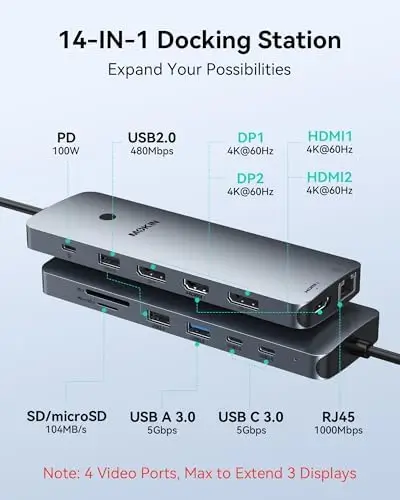
The dock includes two HDMI ports, two DisplayPort ports, an RJ45 Ethernet port, two USB-C 3.0 ports, one USB-A 3.0 port, two USB-A 2.0 ports, SD and microSD card slots, and a dedicated USB-C Power Delivery input.
Having all these connections available from one dock can dramatically simplify a workspace.
Instead of connecting individual adapters for monitors, Ethernet, USB accessories, and memory cards, users can connect their laptop to the docking station and access the necessary peripherals from one central location.
This is particularly useful for desk-based laptop users who regularly connect and disconnect their computers.
Flexible Multi-Monitor Connectivity
Multi-monitor functionality is one of the strongest reasons to consider this docking station.
The MOKiN dock provides two HDMI ports and two DisplayPort ports, giving users considerable flexibility when configuring external displays.
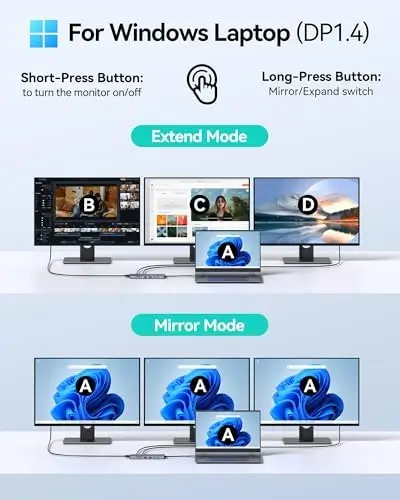
The dock supports configurations such as two HDMI displays plus one DisplayPort monitor, or two DisplayPort displays plus one HDMI monitor, depending on the compatible host system and configuration.
For professionals, having multiple monitors can make multitasking considerably more efficient.
View on Amazon
A user might dedicate one display to email and communications, another to a browser or research materials, and another to a spreadsheet, coding environment, creative application, or project dashboard.
For financial work, programming, content creation, data analysis, and office productivity, additional screen space can help reduce the need to constantly switch between windows.
Triple-Display Potential
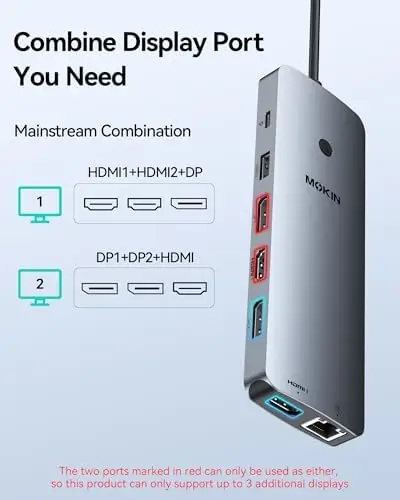
The docking station is designed to support up to three external displays in compatible configurations, making it particularly attractive for users who want a more expansive workstation.
A triple-monitor arrangement can provide a significant productivity advantage.
For example, a professional could keep a video conference on one screen, working documents on another, and reference materials on a third.
Creators can dedicate displays to timelines, previews, and editing tools, while developers can keep code, documentation, and testing environments visible simultaneously.
The exact display capabilities depend on the laptop’s USB-C or Thunderbolt implementation, operating system, graphics capabilities, and connected displays.
It is especially important to note that the dock requires a laptop with Thunderbolt 3/4 or a full-function USB-C port capable of supporting the required display features.
Important macOS Consideration
Mac users should pay close attention to the docking station’s display behavior.
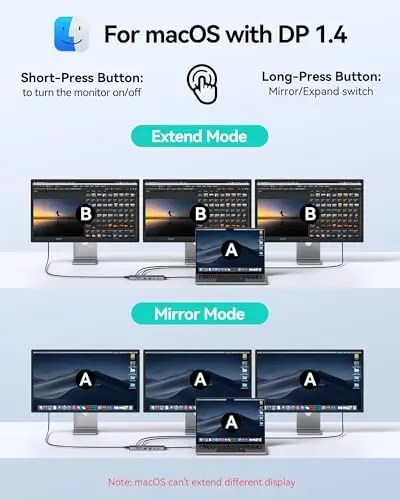
According to the provided specifications, macOS laptops support SST mode, meaning connected external monitors will show the same mirrored display rather than functioning as independent extended screens.
This is an important limitation to understand before building a multi-monitor workstation around this dock.
Windows users with compatible hardware may have more flexibility with multi-display configurations, while Mac users should verify their specific computer model and desired monitor arrangement before purchasing.
Understanding host-system limitations is essential with any multi-monitor docking station, and MOKiN makes this compatibility requirement particularly relevant.
High-Speed 5Gbps USB Connectivity
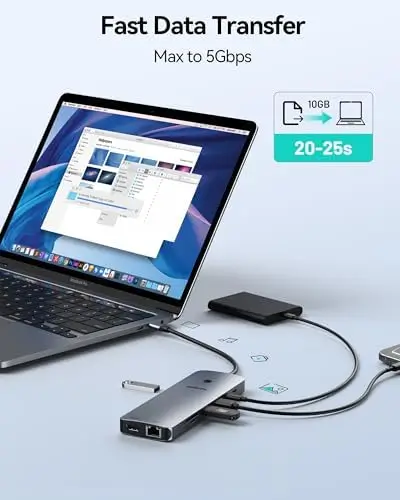
The docking station includes multiple USB ports capable of up to 5Gbps data transfer.
This is useful for connecting external storage drives, USB accessories, peripherals, and other devices that benefit from faster data rates.
Compared with USB 2.0, 5Gbps connectivity provides substantially greater theoretical bandwidth.
For users transferring files between a laptop and external storage, this can make a meaningful difference.
It can also be useful for connecting USB peripherals such as keyboards, mice, webcams, external drives, and other accessories without relying on the limited number of ports built into the laptop itself.
The dock also includes USB 2.0 ports, which are well suited to lower-bandwidth peripherals that do not require high-speed data transfer.
This combination gives users the ability to reserve the faster ports for demanding devices while using the USB 2.0 connections for simpler accessories.
Gigabit Ethernet Connectivity
The built-in RJ45 Ethernet port is another valuable feature.
Modern laptops increasingly rely on Wi-Fi, but wired Ethernet remains useful when stability, consistency, and low latency are important.
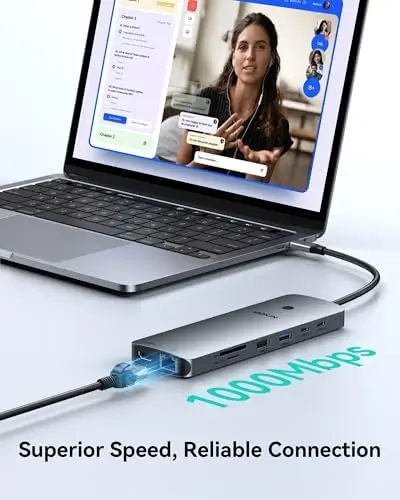
The docking station’s 1000Mbps Ethernet connection can provide a fast wired network connection for compatible setups.
This is particularly useful for office work, video conferencing, large file downloads, cloud synchronization, and online gaming.
For users who work with network-attached storage or regularly transfer large files across a local network, a wired Ethernet connection can also provide a more consistent experience than wireless networking.
Having Ethernet built directly into the dock means users do not need a separate USB-to-Ethernet adapter.
SD and microSD Card Readers
For photographers, videographers, and content creators, the integrated SD and microSD card readers can be particularly convenient.
Many cameras, drones, action cameras, and other devices use removable memory cards, and transferring that content to a laptop is much easier when a dedicated card reader is readily available.
Instead of carrying a separate card reader, users can connect the memory card directly to the docking station.
This is especially practical in a permanent workstation setup where the dock remains connected to a laptop or monitor.
Creators can quickly move photographs, video clips, project files, and other media from their cards to a computer or external storage.
Up to 100W USB-C Power Delivery
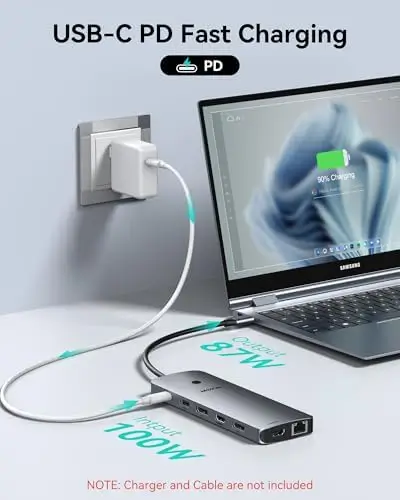
The MOKiN docking station supports up to 100W USB-C Power Delivery for compatible laptops and devices.
This allows the dock to act as both a connectivity hub and a charging interface.
With a compatible 100W power adapter, users can connect power to the docking station while simultaneously using multiple displays, USB accessories, Ethernet, and other peripherals.
This creates a cleaner desktop setup because the laptop can receive power through the dock rather than requiring multiple separate connections.
It is important to note that the charger is not included with the product. Users need to provide a compatible 100W power adapter to take advantage of the full charging capability.
Actual charging power delivered to the laptop can also vary based on system requirements and dock power allocation.
Screen-Off Privacy Button
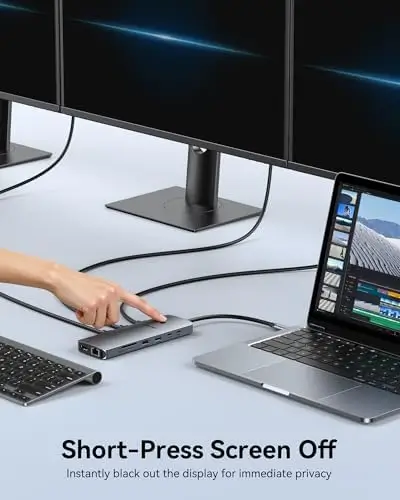
A particularly useful feature is the dedicated screen-off button.
A short press can turn off the connected screens, providing a quick way to protect information when stepping away from the desk.
This can be valuable in professional environments where confidential documents, customer information, financial data, or internal communications may be visible on external displays.
Rather than manually minimizing windows or navigating through display settings, users can quickly turn off their screens.
The feature also makes the dock more convenient for everyday use when temporarily leaving the workstation.
Ideal for Home Offices
The MOKiN docking station is particularly well suited to home-office environments.
A laptop can effectively become the center of a full workstation, with multiple monitors, wired Ethernet, keyboard, mouse, external storage, and other accessories connected through the dock.
When the workday is finished, the laptop can be disconnected from the dock without requiring users to unplug every peripheral individually.
This can make the transition between portable and desktop-style computing much easier.
For remote workers who regularly move between locations, this flexibility can be a major benefit.
Useful for Creative Professionals
Content creators can also benefit from the dock’s extensive connectivity.
Photographers can connect SD cards, external storage, monitors, and network equipment simultaneously.
Video editors can use multiple displays for timelines, previews, editing tools, and project files.
Designers can connect high-resolution displays alongside USB peripherals and external storage.
The combination of display outputs, memory card readers, high-speed USB ports, and Ethernet makes the dock particularly well suited to a workstation where several types of equipment need to remain connected.
A Cleaner Desktop Setup
One of the understated benefits of a docking station is improved cable organization.
Instead of connecting multiple cables directly to the laptop, users can route most peripherals to the dock.
The laptop then requires only the primary connection to the docking station, creating a cleaner and more organized workstation.
This is particularly useful for people who frequently take their laptop away from the desk.
A single connection can replace several individual cables, making it much faster to switch between mobile and desktop working modes.
Final Verdict
The MOKiN 14-in-1 Laptop Docking Station is a versatile connectivity solution designed for users who want to turn a compatible laptop into a more capable desktop workstation.
Its extensive selection of ports is the biggest strength. With two HDMI ports, two DisplayPort outputs, multiple USB-C and USB-A connections, SD and microSD card readers, Gigabit Ethernet, and USB-C Power Delivery, it provides an impressive range of connectivity from a single docking station.
The multi-monitor support is particularly appealing. Compatible Windows laptops can take advantage of flexible combinations of HDMI and DisplayPort connections, with support for configurations involving up to three external displays.
Mac users should be aware of the stated SST limitation, which means connected external displays will mirror the same image rather than operating as independent extended displays. Compatibility should therefore be carefully checked before purchase.
The 5Gbps USB ports are useful for external storage and high-speed peripherals, while the USB 2.0 ports provide convenient connections for lower-bandwidth accessories.
The integrated 1000Mbps Ethernet port is another strong addition, providing stable wired networking for office work, video calls, large downloads, and online gaming.
Photographers and creators will appreciate the built-in SD and microSD card readers, eliminating the need for a separate reader in many workflows.
The up-to-100W USB-C Power Delivery support also helps simplify the desktop by allowing compatible laptops to receive power through the docking station while connected to external displays and peripherals. Users should remember that a compatible 100W charger is required and is not included.
Finally, the screen-off button is a thoughtful privacy feature that makes it easy to quickly turn off connected displays when stepping away from the workstation.
Overall, the MOKiN 14-in-1 Docking Station is a feature-rich solution for laptop users who need more connectivity, multiple displays, fast USB data transfer, wired networking, memory card access, and convenient charging. For home offices, professional workstations, creative setups, and multi-monitor environments, it offers a practical way to consolidate a large collection of peripherals into one organized and versatile docking solution.